SellMyServer.com

Model-specific server buyback

Sell Used Dell PowerEdge Servers

Whether you are refreshing a virtualization cluster or clearing a few retired systems, the exact PowerEdge configuration matters. Send the model, service tag, installed components, quantity, and location so we can evaluate the equipment as a complete lot.

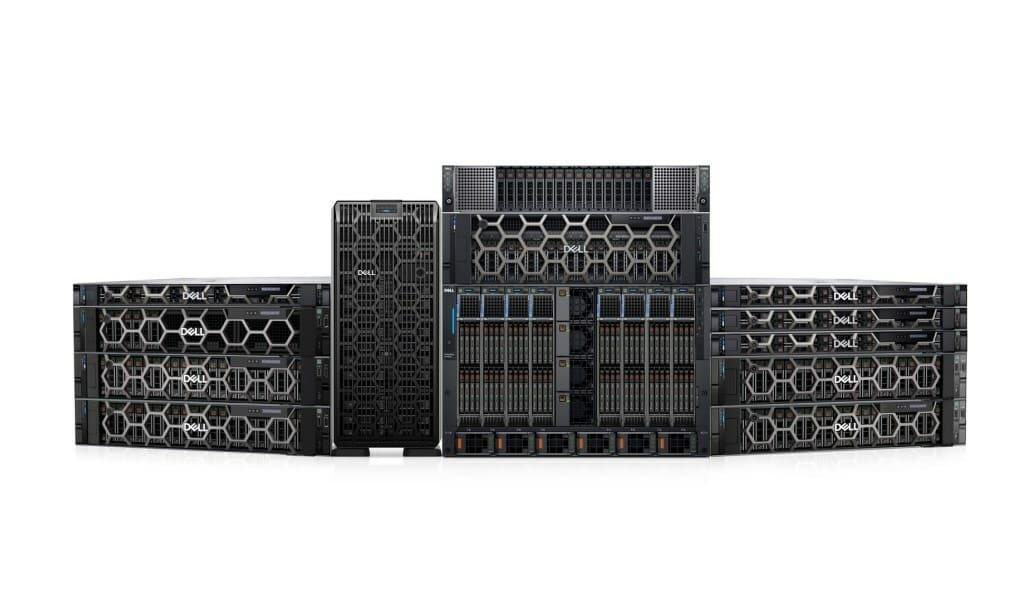
Dell PowerEdge server family
Complete systems or parts
Nationwide U.S. coverage
Configuration-based evaluation
Response target within 24 hours

Dell PowerEdge generations

Compare Dell PowerEdge generations before you sell

Dell groups PowerEdge systems into generations, but individual models can enter the market at different times. The dates below are practical, approximate windows for identifying common systems—not a substitute for the service tag or exact configuration.

Dell PowerEdge generation, approximate years, common models, platform differences, and seller notes
Generation or eraApprox. yearsCommon examplesWhat changedWhat sellers should document
11th generationApprox. 2009–2012R610, R710, R810, T610Xeon 5500/5600 platforms, DDR3 memory, iDRAC6-era managementCPU count, RAM, drive caddies, rails, and working condition determine whether an older system has resale or parts value.
12th generationApprox. 2012–2014R620, R720, R720xd, T620Xeon E5-2600 v1/v2, DDR3, iDRAC7, flexible SFF/LFF storage layoutsThe R720xd and complete drive trays are especially important to identify because storage density changes the buyer pool.
13th generationApprox. 2014–2017R630, R730, R730xd, T630Xeon E5-2600 v3/v4, DDR4, iDRAC8, broader NVMe and expansion optionsList CPU model, DDR4 capacity, RAID card, backplane, and NVMe capability instead of describing the server only as an R730.
14th generationApprox. 2017–2021R640, R740, R740xd, T440, T6401st/2nd Gen Xeon Scalable and related platforms, DDR4, iDRAC9, NVMe and GPU-capable configurationsDrive-bay layout, CPU tier, RAM population, rails, and GPU or accelerator support can create substantial differences between otherwise similar systems.
15th generationApprox. 2021–2023R650, R750, R750xa, R75253rd Gen Xeon Scalable or AMD EPYC 7003, DDR4, PCIe Gen4, expanded NVMe and accelerator supportInclude whether the system is Intel or AMD, the PCIe riser set, GPU power cables, and the complete storage configuration.
16th generationApprox. 2023–presentR660, R760, R760xa, R76254th/5th Gen Xeon Scalable or AMD EPYC 9004, DDR5, PCIe Gen5, newer iDRAC featuresNewer systems are highly configuration-sensitive; processor SKU, DDR5 capacity, NVMe backplane, accelerator support, and warranty status matter.
17th generationApprox. 2025–presentR770 and model-specific current platformsCurrent Xeon 6 and AMD platform options, DDR5, PCIe Gen5, and updated platform security featuresTreat current-generation inventory as model-specific and provide the service tag, purchase context, configuration, and remaining support details.

Dates are approximate market-identification windows. Model introductions overlap, and resale value depends on the exact configuration, condition, completeness, and current demand.

How to identify your Dell PowerEdge

  • Read the model and service tag from the front pull-out tab or chassis label; Dell's service tag is more useful than a photo of the bezel alone.
  • Check iDRAC or the system inventory for CPU, RAM, controller, backplane, NIC, and drive details when the server still boots.
  • Record whether the chassis is SFF, LFF, NVMe-capable, or GPU-capable, and count the included caddies, rails, and power supplies.

What this means for your buyback quote

  • Generation is a starting point; exact CPU, memory, storage, expansion, and completeness determine the offer.
  • Keep servers from the same refresh together, but list each model and configuration so older and newer units are not averaged together.
  • Older PowerEdge systems may still have value as complete systems, upgrade platforms, or tested parts even when they are no longer current-generation equipment.

What affects the offer

The model name is only the starting point.

A complete configuration helps us determine what can be reused, resold, or routed through another disposition path. These details are especially useful for Dell PowerEdge lots.

  • Exact PowerEdge model, generation, service tag, and drive-bay layout
  • CPU model and quantity, RAM capacity, and memory population
  • SAS, SATA, or NVMe storage, caddies, RAID, and backplane details
  • iDRAC, NICs, GPUs, power supplies, rails, bezels, and working condition

Prepare a better inventory

You do not need a perfect spreadsheet. A model list, photos, or a plain-language description is enough to start.

  • Export the asset list from your CMDB or inventory system when available.
  • Include clear photos of service tags, front panels, and installed drives.
  • Tell us whether rails, bezels, caddies, power cords, and spare parts are included.
Download the Excel asset inventory template

Common submissions

Dell PowerEdge platforms we evaluate

These examples are not a limit. Send the exact equipment list for a more accurate review.

PowerEdge R640, R740, and R740xd

14th-generation rack systems commonly used for virtualization, storage, and general enterprise workloads.

PowerEdge R650, R750, and R760

Newer 1U and 2U platforms with DDR4 or DDR5 configurations and flexible expansion options.

PowerEdge T440 and T640

Tower systems used for branch, office, edge, and smaller data-center deployments.

PowerEdge C-series

High-density and multi-node compute platforms where node, CPU, memory, and chassis details drive value.

Clear evaluation

We review model, configuration, condition, quantity, location, and current secondary-market demand.

Security options

Discuss data-bearing media and sanitization requirements before equipment moves through the handoff.

Practical logistics

After an offer is accepted, we coordinate the next shipping, freight, or pickup step for qualifying lots.